 |
The PRISM concern investigation environment |

Prism is released as an Eclipse plug-in binary in a beta version. It is developed and tested on the Eclipse 3.2 platform. It does not support Java 5 specific Java sources. You can download a copy here.
The Prism concern investigation Eclipse plug-in provides two types of new functionalities: 1. an extension to the Eclipse JDT Java search; 2. a ranking recommender which computes the ranks for all elements in a Java Eclipse project using the algorithm described in our paper. We use an umbrella term "query" to denote both kinds of investigation activities.
The Prism search query is different from the Eclipse JDT search capabilities in two ways: 1. it employs the type pattern language introduced in AspectJ as the basis of query expression; 2. it allows the specification of scopes, i.e., searching elements residing or containing other elements of certain patterns. The complete description of this capability is described in the language specification of the Prism query language
The Prism rank query is a new feature provided to rank elements, i.e., classes and methods, in the selected Java project according to how they are referenced. Each ranking computation takes a group of parameters which can be specified from the plugin GUI, and the ranking results are available for both the significance (how important the element is) and the popularity (how wide-spread the element is referenced) measures.
Let us now explain these features in detail with a step-by-step illustration.
The use of the plug-in requires the pre-installation of the pql indexer bundled as a special version of the AspectJ compiler. The indexer can be obtained through this link. Please follow the installation instruction after invoking: java -jar prismajc.jar, and make a note of where the compiler is installed.
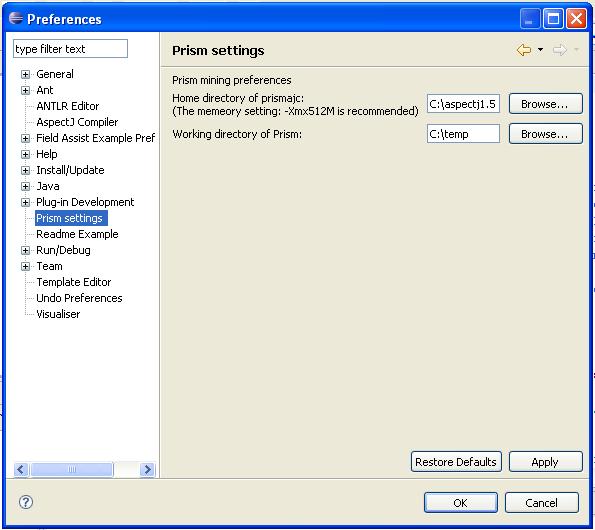
Once the installation completes, the Prism plug-in requires two directory names to be set via the Eclipse preference pages as in Figure 1. Both the installation directory of the PQL indexer needs to specified, and the working directory of the Prism need to be specified here.
Figure 1:
The Prism Eclipse Preference Settings
 |
Once loaded, the features of Prism plug-in can be accessed in the Prism perspective as shown in Figure 2. There are four panes (or viewers) in the perspective, two new kinds showing the queries and the results, labeled 1 and 4, and two from Eclipse JDT showing the Java code and its structural outline, labeled 2 and 3. This perspective can be opened in the usual way where perspectives are opened in Eclipse or through the context menu upon selecting a project as shown in Figure 3. The ``reload'' submenu re-indexes the project, a process to be explained in later sections.
Figure 2:
The Prism Eclipse Plugin
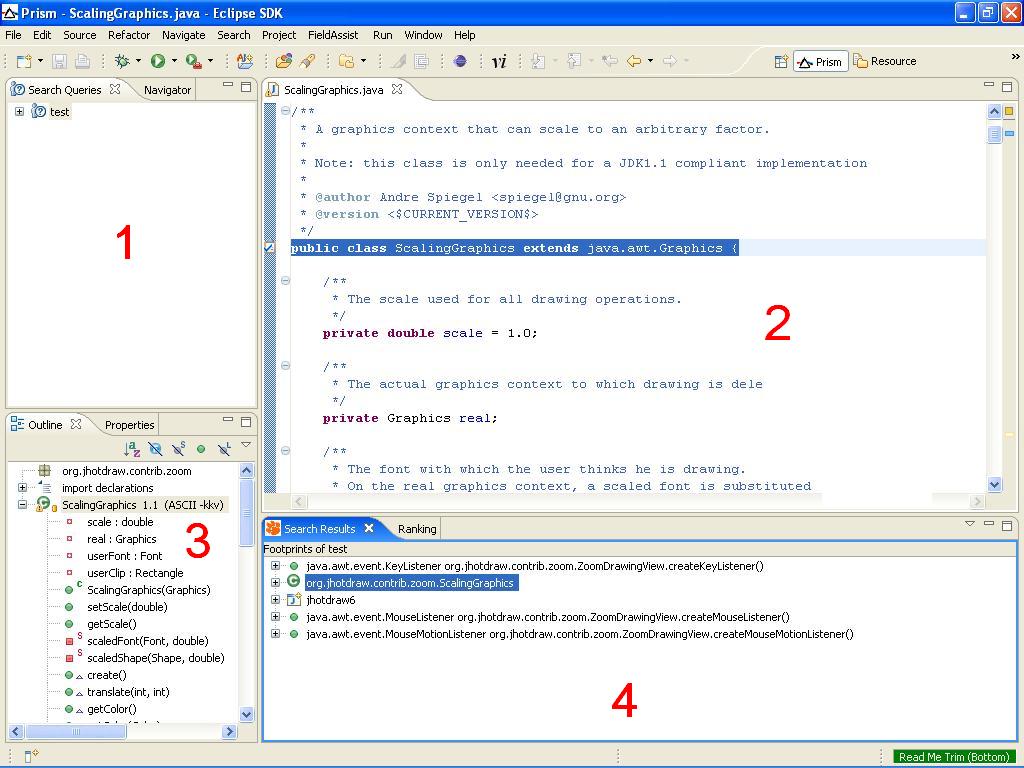 |
Figure 3:
Load a project into Prism
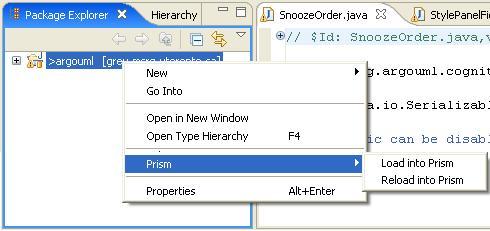 |
For both ways of opening the Prism perspective, a project needs to be selected in either the Java or the Resource perspective by accessing the context menu as in Figure 3. The ``Load'' menu will invoke the PQL indexer and generate an index file for the selected project. Please note that the indexing process can be lengthy if the project is large or depending on many other projects. This index file is generated only once for the selected project. Should the selected project change or evolved, the project needs to be re-indexed through accessing the ``Reload'' context menu as in Figure 3.
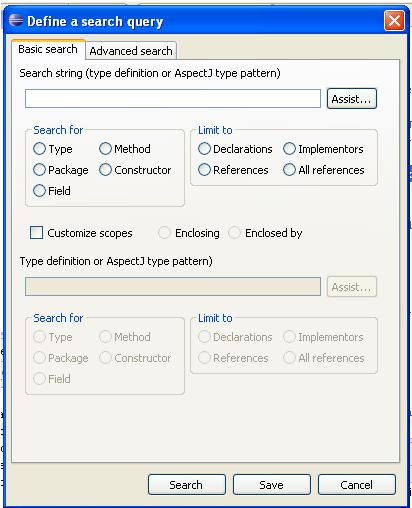
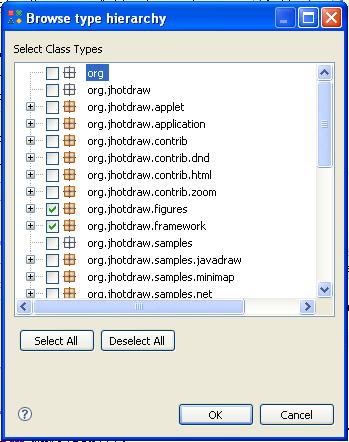
The Prism plug-in provides a similar search interface to that of the Eclipse JDT. The search interface can be opened through right-clicking the query pane as in Figure 4, and the query specification dialog is shown in Figure 5. Compared to JDT search, the Prism search requires the use of type patterns borrowed from the AspectJ language. The type pattern is an intuitive and concise pattern language for specifying groups of Java type elements. The Prism search provides the automatic composition assistance through the type browser available via the ``Assist'' button, as in Figure 6. The user can select any number of elements, as long as they are of the same kind, and the type patterns characterizing the selections are composed after the browser is closed.
Figure 4:
Adding a new query
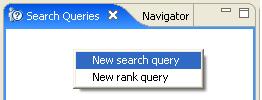 |
Figure 5:
Defining a new query
 |
|
Figure 6:
Type browsing
 |
|
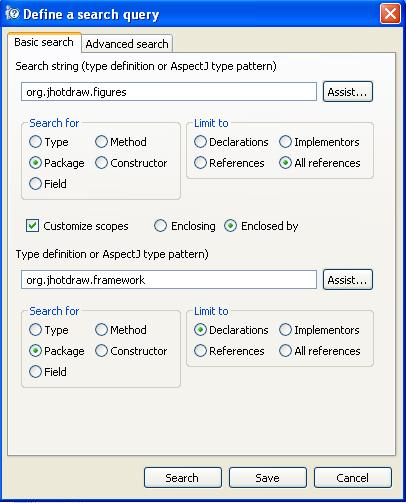
An important extension in the Prism search, as compared to that of JDT, is that searching can be scoped. For this purpose, the lower part of the search specification dialog allows user to specify, as in the upper part, the type patterns representing the scoping criteria. The scoping criteria can be used to present Java elements containing or being contained by the Java elements specified in the upper part. For instance, as illustrated in Figure 7, specifying on the top part with ``any reference'' to the package org.jhotdraw.figures, on the lower part with ``declaration'' of the package org.jhotdraw.framework, and with ``Enclosed by'' checked represents a query that will search for any references to tye types in the org.jhotdraw.figures package that are defined within the types in the org.jhotdraw.figures package. . Notice that with the Prism search semantic, a package is treated as a conglomeration of the types with it, not the package declaration itself.
Figure 7:
Scoping the search
 |
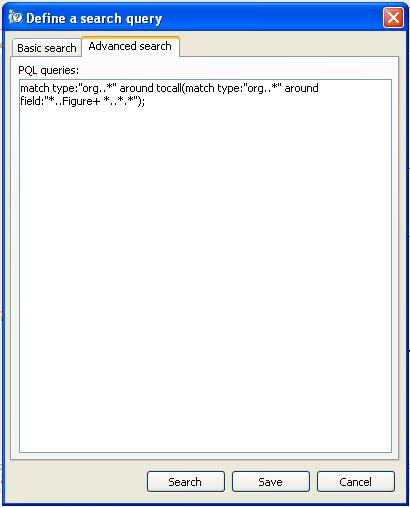
The ``Advanced search'' tab on the search dialog, as in Figure 8, reveals the underpinning query language, i.e., what the search settings translate to. The query language, namely, PQL, is explained in detail in a separate document . Figure 8 shows a glimpse of the language used to find class types that make calls to types declaring any subtypes of Figure as fields. Note that, once choosing editing the query at the language level, the GUI-based query specification is disabled.
Figure 8:
Advanced query specification
 |
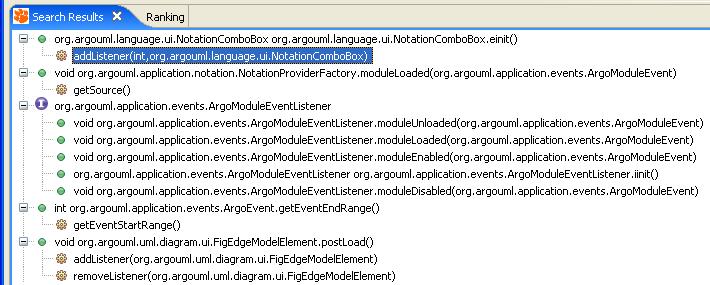
The results of the query are displayed in the ``Search Results'' view provided by the plug-in. By default, the results are binned according to where the elements matching the query are found as shown in Figure 9. Clicking on any element in the view opens the source editor and highlights where the element is defined. A viewer option is provided to change the display to list directly the found elements on the top level of the display hierarchy.
Figure 9:
Results of a query
 |
The rank query produces ranks for elements of the selected Java project, currently limiting to class types and methods. The ranking mechanism employs a random-walk based algorithm reflects how significantly or popular an element is in terms of its position in the knowledge network extracted from the project source. This feature is implemented as part of the research described in the paper.
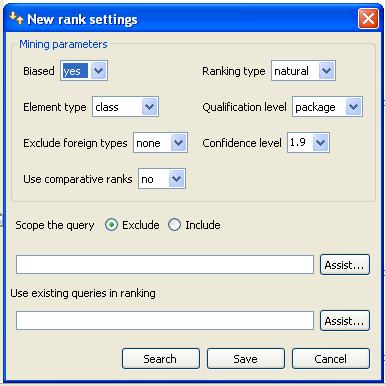
The rank query can be specified through the rank query dialog as shown in Figure 10. The options are explained as follows:
- Biased (true or false) This option tells the query engine whether to use the total number of references between two elements for the ranking calculation or not.
- Ranking type (natural or diff) The query engine has two ways of generating the ranks: natural and differentiated. Please see paper for details.
- Element type (type or method) This option tells the query engine to work on either the component level, in the case of multiple Prism indices are loaded, or the class level, or the method level.
- Qualification level (type or package) This option tells the query engine how to qualify the relationships between two elements. The "type" level qualifies every relation involving two different types. The "package" level only allows relations involving elements in two different packages.
- Exclude foreign types (java or all or none) This option tells the query engine to ignore certain kinds of elements. The "java" option filters out all the classes starting with "java", thus including "javax". And the "all" option ignores all binary types from libraries.
There are two additional options: scoping and reusing existing queries, relating to a feature described as domain knowledge injection. This feature is explained in the next section.
Figure 10:
Specify a rank query
 |
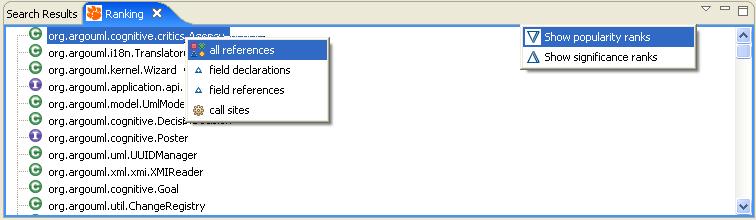
The query results are displayed in the ``Ranking results'' view as shown in Figure 11. By default, the view displays the results in the descending order of their popularity values. View options are provided to switch to the ordering in siginificance values. Figure 11 also shows that, upon selecting a ranked element, the user can issue immediate queries about this element through the context menu to learn about their actual presences in the code base.
Figure 11:
Rank results
 |
Prism also provides a few options that allow the users to influence the default behaviors of the ranking engine by injecting the domain knowledge about the investigated system. Domain knowledge injections are in the forms of declarative PQL queries and can leverage the full descriptive capabilities of PQL. The ranking engine supports the following ways of knowledge injections.
- Exclusion - For large applications, a human miner is often only interested in investigating parts of the code space. For instance, software packages such as the graphic editor, JHotdraw, often include a large number of sample applications which, albeit not useful in understanding the internals of the JHotdraw framework itself, can skew the mining results significantly. For example, the query match type:"org..samples.*" filters out all sample code shipped with JHotdraw version 6. It can used as the excluding scoping query to ask the ranking exclude all sample applications.
- Specialization - Similar to exclusion, the ``including scoping query'' can be used to narrow the scope of processed elements. This is analogous to search engines combining ranks with a certain type of context such as keywords or locality. For instance, the user can produce rankings only for subtypes of Figure by using the PQL query: match type:"*..Figure+".
- Customization - The default concern types understood by the ranking engine are module types defined in the Java language such as method, class, or package. However, concerns do not always have to align with the boundaries of modules. Instead, they can be mapped to patterns in the type space. For example, the concept of figure element covers all subtypes of the type Figure. In the JHotdraw 6 distribution, these types span four different Java packages. Concerns can also be mapped to composition patterns. For example, the concept of networking layer can be defined as all types having fields of type Socket. Concerns can also be mapped to interaction patterns such as defining the concept of Event generator to be types invoking the fireEvent method. The ranking engine is capable of provisioning these three kinds of user-defined concepts by using the queries already defined directly as the ranking targets. All defined queries can be accessed via the ``Assist'' button.
All bugs and suggestions are to be sent to : charles.zhang@ieee.org.
The following people have contributed to the development of AMTEX, the predecessor of Prism, and to Prism itself: Gao Dapeng, Krystal Wang,
and Helen Shi. The Prism Eclipse plugin was developed under the Eclipse Innovations Grant 2003 from IBM.